
For iPhone
CalvingPocket: Calf Records
Fast Offline Calving Book
A pocket calving book for small family-operated cow-calf ranches. Capture essential birth details while you are still in the field.
No herd setup. Save without a calf tag, then complete the same record later. Activate access before heading offline.
Available on the US App Store
7-day full trial · $19.99 lifetime · No subscription
Free download · iOS 18 or later. Link opens the US store. Availability and local prices depend on your Apple account region.

See it in action
Real App screens captured on an iOS 18 simulator, October 30, 2026. Fictional records.
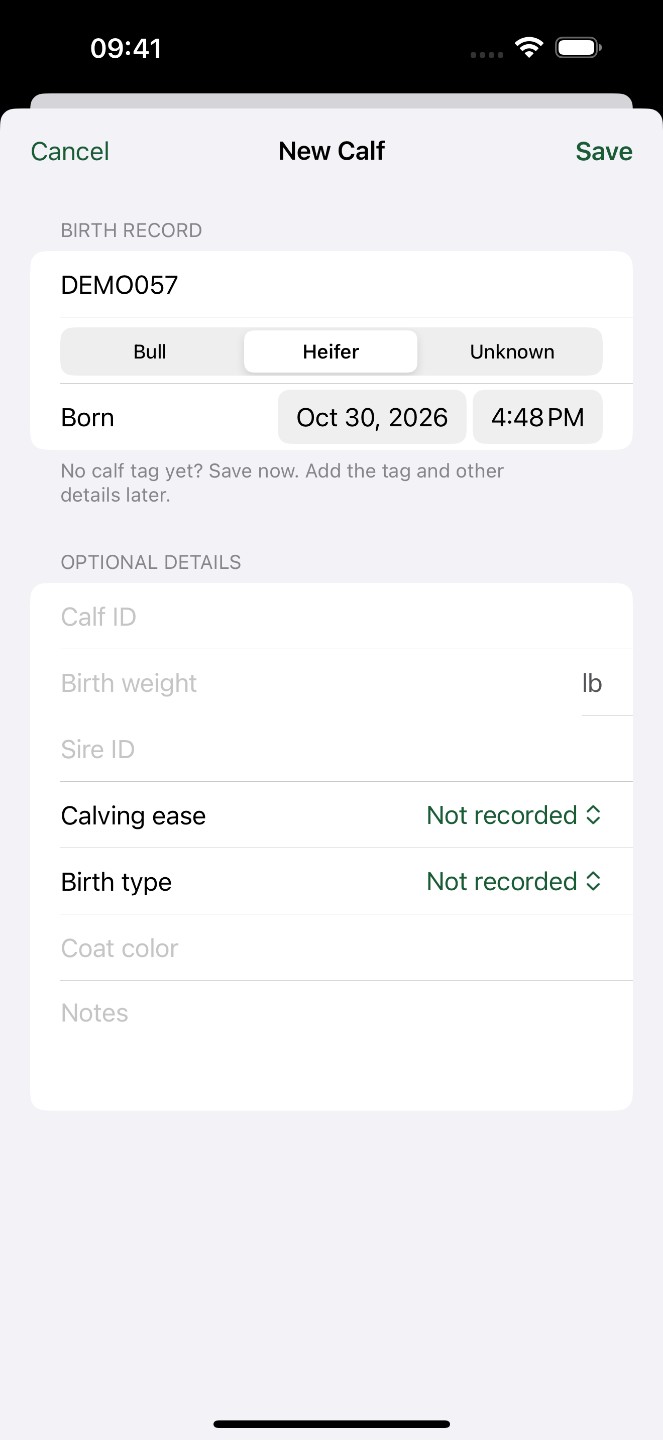
Record now. Complete later.
A newborn calf should not have to wait for herd setup or an ear tag before it has a record. Capture the birth first and complete the details later.
Open New Calf.
Start in the current calving season without setting up a ranch or herd.
Enter Dam ID and sex.
The birth time defaults to now. Save without a permanent Calf ID.
Add the tag later.
Find the temporary Untagged record, then add the calf tag and other details.
See it in action
Real App screens captured on an iOS 18 simulator, October 30, 2026. Fictional records.
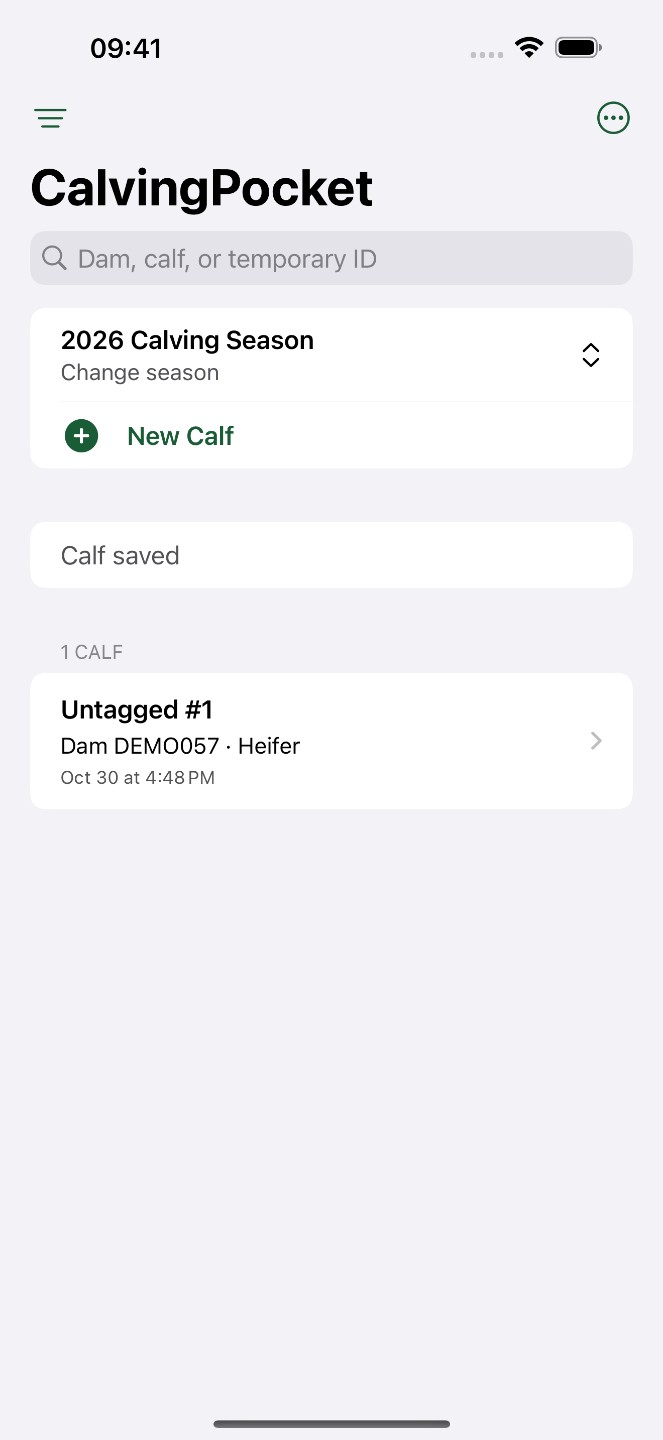
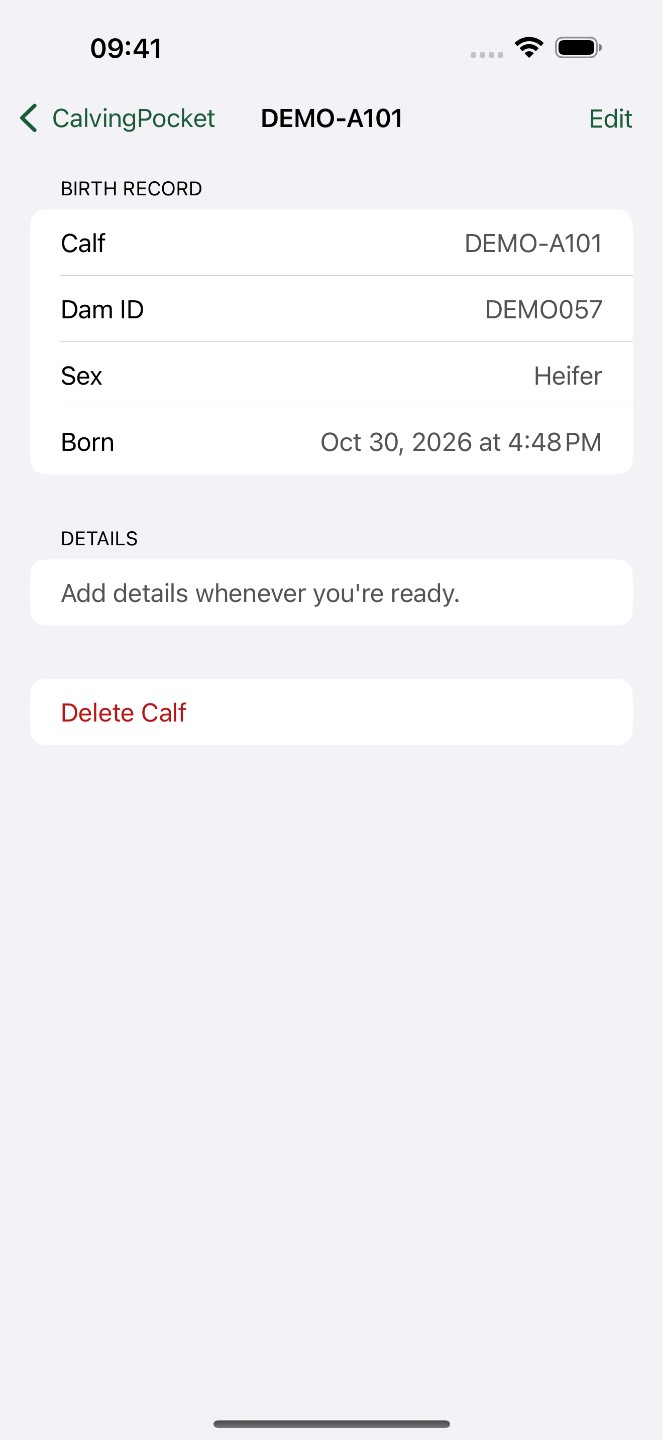
One birth. A tag added later.
Save a birth for dam DEMO057 with no calf tag. CalvingPocket gives it Untagged #1. Later, edit that same record to add DEMO-A101; the dam and birth details stay together.
Real App screens recorded on an iOS 18 simulator, October 30, 2026. Fictional records, English interface and local test access. The silent video is edited; it does not measure field entry time.
Main features
- Immediate calf entry with an optional Calf ID
- Birth time, birth weight and dam identifiers
- Season lists, search, filters and notes
- CSV, printable season PDF and full backup
Is it right for you?
No herd setup required. No account, ranch, herd or cow profile is needed before recording a calf. Keep a focused birth record, with an optional permanent tag and details you can add later.
Choose it for offline birth records with dam and calf identifiers, including details completed later. It is not full herd management and does not track vaccination, photos or weight history.
Pricing
Try everything free for 7 days. Unlock the full app with a $19.99 one-time purchase. No subscription.
The trial starts when you choose it and confirm with the App Store. It does not charge automatically. No ads or usage limits on core features after unlock. Initial activation and purchases require an App Store connection.
Prices shown in USD. The App Store displays the applicable local price before purchase.
Export and backup
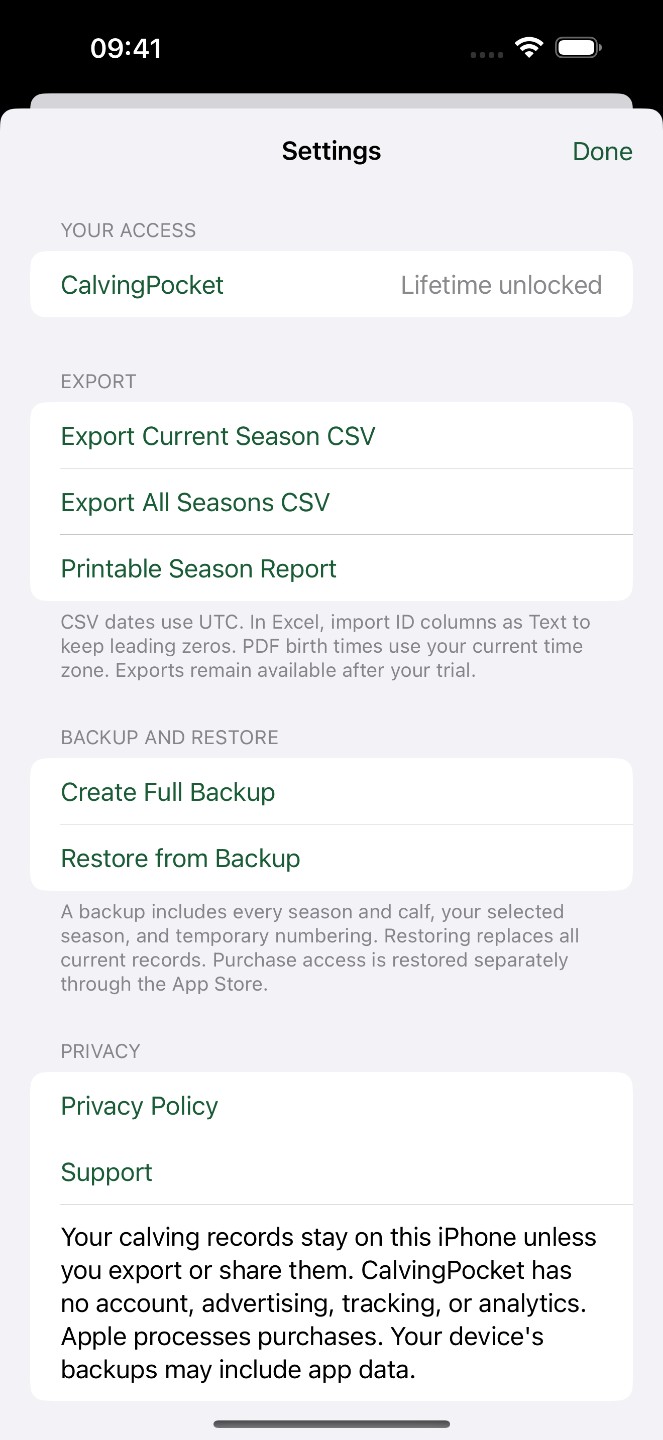
Export records as CSV or a printable season PDF. CSV birth times use UTC; PDF times use the iPhone’s current time zone. When importing CSV into a spreadsheet, set ID columns to Text to preserve leading zeros.
In Settings, choose Create Full Backup and save the file. Restore from Backup validates the file and shows record counts before you confirm replacement of the current book. Save a separate backup first.
Common questions
Can I save a calf birth before adding its ear tag?
Yes. Enter the dam ID and sex; the birth time defaults to now. Leave Calf ID empty to save an Untagged record. Later, edit that same record to add the permanent tag without creating a duplicate calf.
Do I need to set up a herd or create an account first?
No. CalvingPocket is a focused calving book for small cow-calf ranches. Start recording in the current season without creating an account, ranch, herd or separate cow profiles.
Can I record calves offline?
Yes, with active access. Before leaving mobile coverage, connect to the internet and activate the seven-day trial through the App Store, or restore your existing purchase in Settings. Check your access before heading out. Birth records are stored on your iPhone.
Is CalvingPocket a subscription, and what happens after the trial?
The seven-day free trial does not renew or charge automatically. Optional lifetime access is a one-time purchase (US reference price: $19.99; check your local App Store). After expiry, you can still view, delete, export, back up and restore existing records. Adding or editing records requires lifetime access.
Does CalvingPocket automatically sync between phones?
No. Records live on one iPhone, with no account or built-in cloud sync. To move the book, create and save a full backup in Settings, then restore that file on the other iPhone. Restore replaces the current book after confirmation, so save a separate backup first.
Can I import a spreadsheet or use CSV as a full backup?
CalvingPocket exports CSV for use in a spreadsheet; it does not import arbitrary CSV files. Use Create Full Backup and Restore from Backup to preserve and restore the complete book. CSV and printable PDF are exports, not full backups.
What should I check when opening an exported calving record?
CSV birth times use UTC; printable season PDF times use the iPhone’s current time zone. When opening CSV in a spreadsheet, set ID columns to Text to preserve leading zeros. Check the season and selected export scope before sharing.
Can I work offline? Do I need an account or cloud sync?
Calving seasons and calf records are stored on your iPhone and work offline. The app has no account, cloud sync, photo management or location tracking. Files leave the app when you choose an export or through your device backup settings.
How do I back up or move to another iPhone?
In Settings, choose Create Full Backup and save the file. Restore from Backup validates the file and shows record counts before you confirm replacement of the current book. Save a separate backup first.
Product information
Ready to try it?
7-day full trial · $19.99 lifetime · No subscription
Free download · iOS 18 or later. Link opens the US store. Availability and local prices depend on your Apple account region.